
![[ Substance 3D Painter ] How to set up imported materials](https://www.plamophy.com/wp-content/uploads/substance3dpainter-ec-painting-decal-import-01.jpg)
One way to set up imported materials is to drag and drop them directly onto the mesh in the viewport.
Alternatively, if you have baked an ID map, you can hold down the [ Ctrl ] key and drag and drop to assign the ID map.
Another way to assign decal materials is to Alt-drag and drop.
In this article, I would like to check how to set imported decal materials using the [ Alt ] key.
For details on how to import, please refer to this page.
How to set up imported decal materials
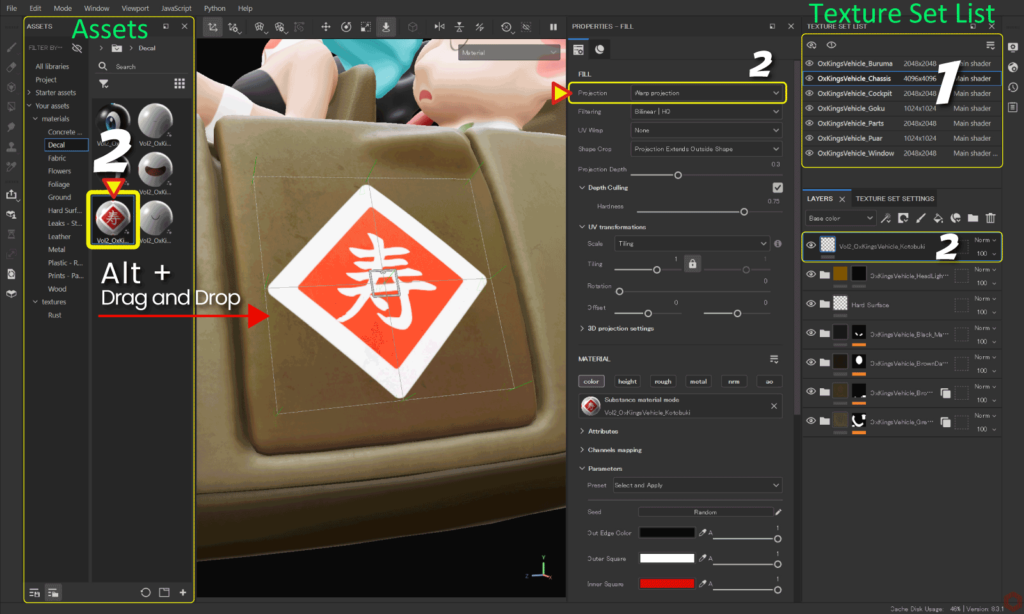
- Select the texture set you want to edit from [ Texture Set List ].
- Alt-drag and drop the imported decal material directly onto the mesh.
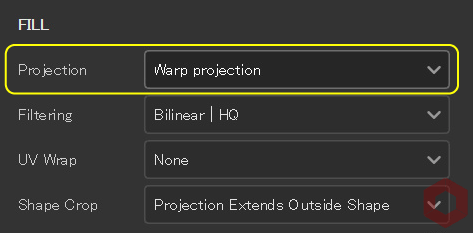
If you hold down the [ Alt ] key while adding, the projection method will be automatically set to Wrap projection.![]()
Additionally, a layer is automatically created in the [ Layers ] window. - Adjust position, angle, scale, and adjust parameters in the viewport.
You can show/hide, move, rotate, and zoom the manipulator using the icons at the top of the viewport.
The position, angle, and scale values in the manipulator are reflected in [3D projection settings].
Warp projection is a projection method that fits along the mesh. You can also transform the texture to adjust the shape.
Please refer to this page for details.
Substance 3D documentation
Summary
We have confirmed how to set the material of the decal material using the [ Alt ] key.
By using the [ Alt ] key, the projection method will automatically be set to Wrap projection, making subsequent adjustments easier!
On the next page, we will check how to set up the imported textures!
Next page Let's go!
![[ Substance 3D Painter ] How to import materials and textures](https://www.plamophy.com/wp-content/uploads/substance3dpainter-ec-resource-import-01-300x125.jpg)
![[ Substance 3D Painter ] How to set imported textures](https://www.plamophy.com/wp-content/uploads/substance3dpainter-ec-painting-filllayer-texture-01-300x125.jpg)
![[ Substance 3D Painter ] How to set the environment map and adjust brightness](https://www.plamophy.com/wp-content/uploads/substance3dpainter-ec-display-settings-01-150x150.jpg)
![[Substance 3D Painter] Rendering setting items](https://www.plamophy.com/wp-content/uploads/substance3dpainter-ec-rendering-01-150x150.jpg)
![[ Substance 3D Painter ] How to bake to change resolution and cage for each Texture Set](https://www.plamophy.com/wp-content/uploads/substance3dpainter-ec-baking-mode-syncparameters-01-150x150.jpg)
![[ Substance 3D Painter ] ベイクの手順と共通設定](https://www.plamophy.com/wp-content/uploads/substance3dpainter-ec-baking-mode-01-300x125.png)
![[ Substance 3D Painter ] テクスチャエクスポートの設定方法](https://www.plamophy.com/wp-content/uploads/substance3dpainter-ec-export-textures-01-300x125.jpg)
![[ Substance 3D Painter ] 半透明マテリアルのシェーダー設定方法](https://www.plamophy.com/wp-content/uploads/substance3dpainter-ec-shader-settings-alpha-blending-01-300x125.png)
![[ Substance 3D Painter ] ペイントブラシの設定方法](https://www.plamophy.com/wp-content/uploads/substance3dpainter-ec-painting-brush-setting-01-300x125.jpg)
![[ Substance 3D Painter ] シンメトリーを使用したペイント方法](https://www.plamophy.com/wp-content/uploads/substance3dpainter-ec-painting-brush-symmetry-01-300x125.jpg)
![[ Substance 3D Painter ] ポリゴン塗りつぶしツールを使用したマスキング方法](https://www.plamophy.com/wp-content/uploads/substance3dpainter-ec-masking-polygon-fill-01-300x125.jpg)
![[ Substance 3D Painter ] 色相の変更とグラデーションの作成方法](https://www.plamophy.com/wp-content/uploads/substance3dpainter-ec-painting-color-variations-01-300x125.jpg)
![[ Substance 3D Painter ] レンダリングの設定項目](https://www.plamophy.com/wp-content/uploads/substance3dpainter-ec-rendering-01-300x125.jpg)
![[ Substance 3D Painter ] 環境マップの設定と明るさの調整方法](https://www.plamophy.com/wp-content/uploads/substance3dpainter-ec-display-settings-01-300x125.jpg)
![[ Introduction to Substance 3D Designer ] Basic steps to output to Substance 3D Painter](https://www.plamophy.com/wp-content/uploads/substance3ddesigner-ec-camouflage-01-300x125.jpg)
![[ Unreal Engine 5.3.1 ] How to use Procedural Content Generation (PCG)](https://www.plamophy.com/wp-content/uploads/unrealengine-ec-pcg-01-300x125.png)
![[ Substance 3D Painter ] How to use the stencil](https://www.plamophy.com/wp-content/uploads/substance3dpainter-ec-painting-brush-stencil-01-300x125.jpg)