
![[ Substance 3D Painter ] How to change the hue and create a gradient](https://www.plamophy.com/wp-content/uploads/substance3dpainter-ec-painting-color-variations-01.jpg)
Substance 3D Painter offers many filters such as Bevel and Blur.
One of these filters is HSL Perceptive, which is used to change the hue.
Also, by using it in conjunction with the generator Position that can create gradations, you can create variations in color.
In this article, I would like to check how to change the hue and create a gradation.
About how to change the Hue
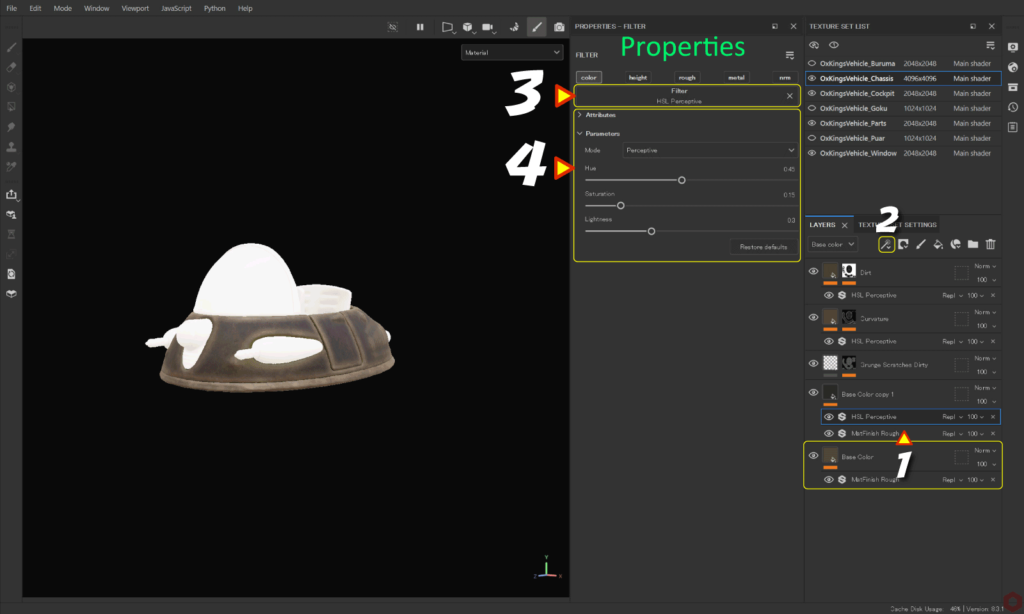
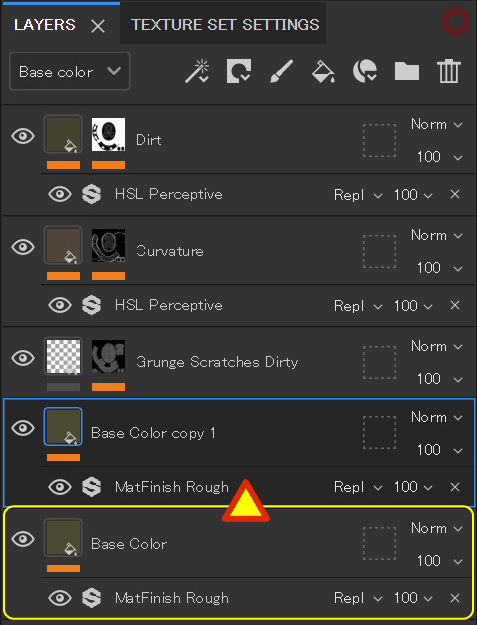
First, copy the base color layer and reuse it as a hue change layer.
- With the layer with the basic color set selected, duplicate the layer using Ctrl + [ D ] keys.
![]()
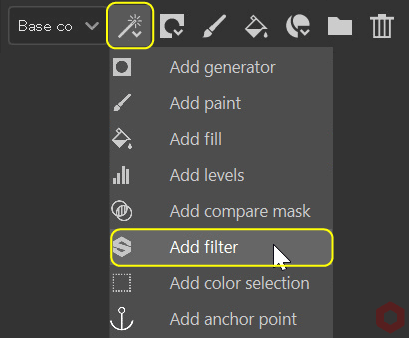
For more information on fill layers with basic colors, please refer to this page. - Click the [ Add effect ] icon and select [ Add filter ].
![]()
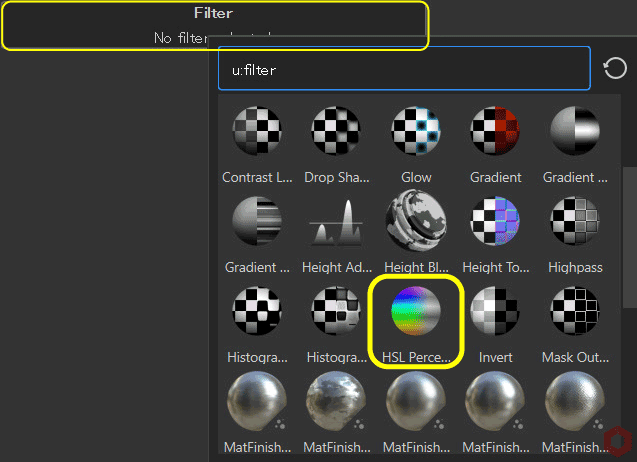
- Click the [ Filter ] button and select [ HSL Perceptive ].
![]()
- Adjust the parameters to change the hue.
How to add a gradient
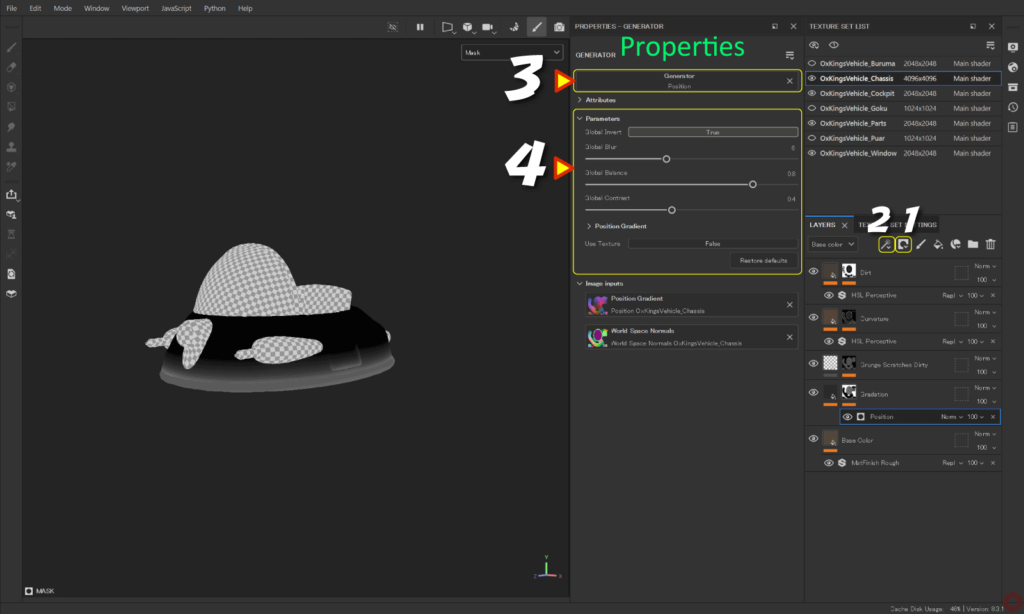
- Select the layer you copied earlier,
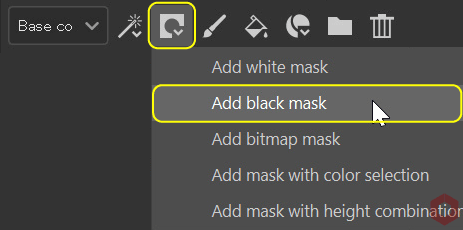
Click the [ Add mask ] icon and select [ Add black mask ].![]()
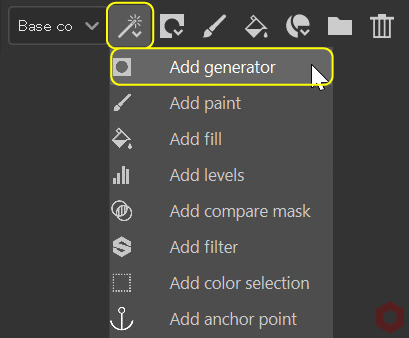
- Click the [ Add effect ] icon and select [ Add generator ].
![]()
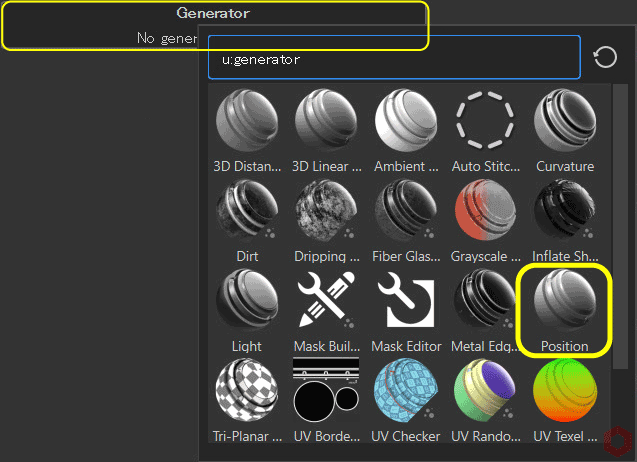
- Click the [ Generator ] button and select [ Position ].
![]()
- Adjust parameters.
You can easily adjust parameters by checking the status while switching channels with the [C] key.
Press the [M] key to return to the original state.
Summary
We have confirmed the hue change filter HSL Perceptive and how to create gradations.
You can also create color variations by combining these two!
Check out how to mask using ID Map on the next page!
Next page Let’s go!
![[ Substance 3D Painter ] How to create the generator Dirt](https://www.plamophy.com/wp-content/uploads/substance3dpainter-ec-painting-dirt-01-300x125.png)
![[ Substance 3D Painter ] How to mask using ID Map](https://www.plamophy.com/wp-content/uploads/substance3dpainter-ec-masking-id-map-01-300x125.png)
![[ Substance 3D Painter ] How to use the stencil](https://www.plamophy.com/wp-content/uploads/substance3dpainter-ec-painting-brush-stencil-01-150x150.jpg)
![[ Substance 3D Painter ] How to set up texture export](https://www.plamophy.com/wp-content/uploads/substance3dpainter-ec-export-textures-01-150x150.jpg)
![[ Substance 3D Painter ] How to add a metal filter](https://www.plamophy.com/wp-content/uploads/substance3dpainter-ec-painting-filter-01-150x150.jpg)
![[ Substance 3D Painter ] How to import materials and textures](https://www.plamophy.com/wp-content/uploads/substance3dpainter-ec-resource-import-01-150x150.jpg)
![[ Substance 3D Painter ] マテリアル、テクスチャのインポート方法](https://www.plamophy.com/wp-content/uploads/substance3dpainter-ec-resource-import-01-300x125.jpg)
![[ Substance 3D Painter ] ベイクの手順と共通設定](https://www.plamophy.com/wp-content/uploads/substance3dpainter-ec-baking-mode-01-300x125.png)
![[ Substance 3D Painter ] テクスチャエクスポートの設定方法](https://www.plamophy.com/wp-content/uploads/substance3dpainter-ec-export-textures-01-300x125.jpg)
![[ Substance 3D Painter ] 半透明マテリアルのシェーダー設定方法](https://www.plamophy.com/wp-content/uploads/substance3dpainter-ec-shader-settings-alpha-blending-01-300x125.png)
![[ Substance 3D Painter ] ペイントブラシの設定方法](https://www.plamophy.com/wp-content/uploads/substance3dpainter-ec-painting-brush-setting-01-300x125.jpg)
![[ Substance 3D Painter ] シンメトリーを使用したペイント方法](https://www.plamophy.com/wp-content/uploads/substance3dpainter-ec-painting-brush-symmetry-01-300x125.jpg)
![[ Substance 3D Painter ] ポリゴン塗りつぶしツールを使用したマスキング方法](https://www.plamophy.com/wp-content/uploads/substance3dpainter-ec-masking-polygon-fill-01-300x125.jpg)
![[ Substance 3D Painter ] 色相の変更とグラデーションの作成方法](https://www.plamophy.com/wp-content/uploads/substance3dpainter-ec-painting-color-variations-01-300x125.jpg)
![[ Substance 3D Painter ] レンダリングの設定項目](https://www.plamophy.com/wp-content/uploads/substance3dpainter-ec-rendering-01-300x125.jpg)
![[ Substance 3D Painter ] 環境マップの設定と明るさの調整方法](https://www.plamophy.com/wp-content/uploads/substance3dpainter-ec-display-settings-01-300x125.jpg)
![[ Introduction to Substance 3D Designer ] Basic steps to output to Substance 3D Painter](https://www.plamophy.com/wp-content/uploads/substance3ddesigner-ec-camouflage-01-300x125.jpg)
![[ Unreal Engine 5.3.1 ] How to use Procedural Content Generation (PCG)](https://www.plamophy.com/wp-content/uploads/unrealengine-ec-pcg-01-300x125.png)
![[ Substance 3D Painter ] How to use the stencil](https://www.plamophy.com/wp-content/uploads/substance3dpainter-ec-painting-brush-stencil-01-300x125.jpg)