
![[ Substance 3D Painter ] How to use the clone tool and blend mode Passthrough](https://www.plamophy.com/wp-content/uploads/substance3dpainter-ec-painting-brush-clone-01.jpg)
As you progress in texture creation, you may want to use brushes to duplicate and adjust existing areas.
A clone tool is used for this purpose.
If the clone tool does not produce the desired results, you may need to change the blend mode to Passthrogh.
In this article, I would like to check how to use the clone tool.
How to use the clone tool and blend mode Passthrough
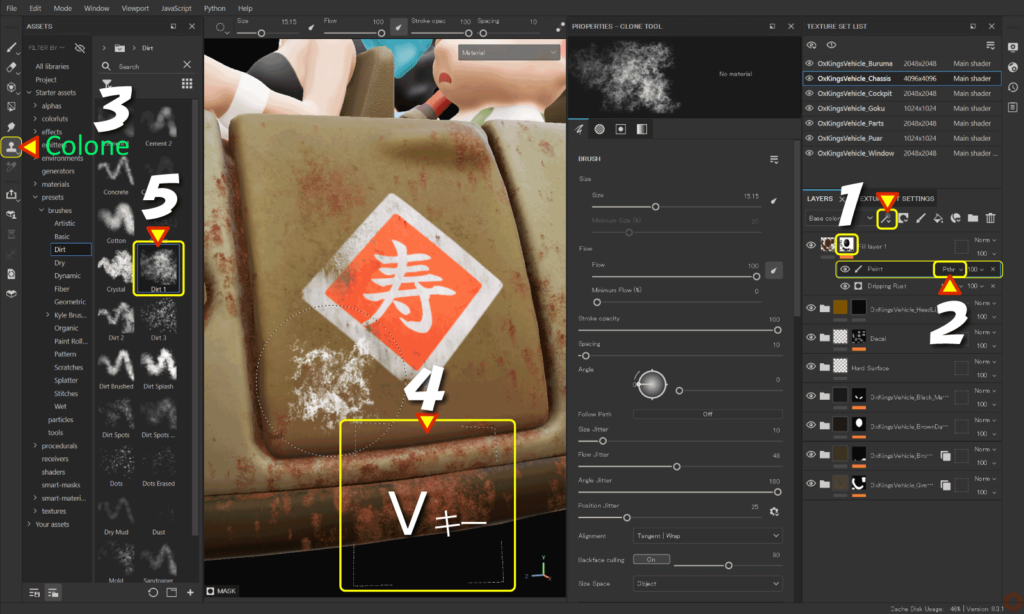
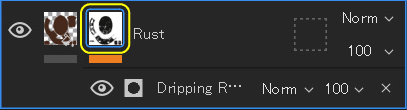
- With the mask selected,
![]()
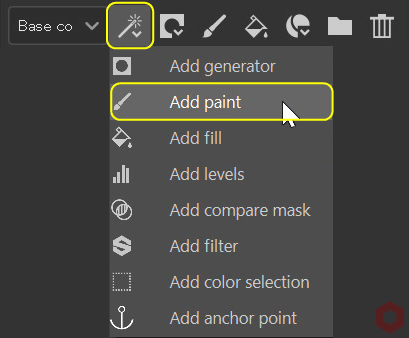
Click the [ Add effect ] icon and select [ Add paint ].![]()
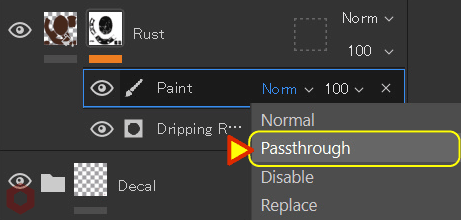
- Change the blend mode to [ Passthrough ].
![]()
When you change the blend mode to [ Passthrough ],
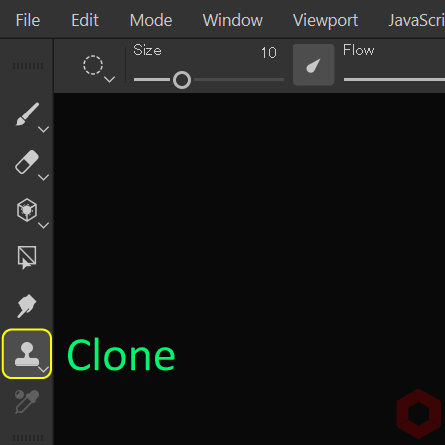
You can duplicate from the layer below you are working on. - Click the [ Clone ] button on the left side of the screen and select the clone tool.
![]()
- Move your mouse to the location you want to duplicate, hold down the [ V ] key, and left-click.
- Select [ presets > brushes ] from [ Assets ] and select the brush you want.
Set the brush size, angle, etc. and paint.
For information on how to select brushes, see this page.
For more information on how to set up brushes, please see this page.
・Brush size
Ctrl + right click + slide left/right
・Brush blur level
Ctrl + right click + slide up/down
・Brush opacity
Ctrl + left click + slide left/right
・Brush angle
Ctrl + left click + slide up/down
Summary
We have confirmed how to use the clone tool in conjunction with the blend mode Passthrogh.
Passthrogh's blend mode allows you to use the clone tool to duplicate from the layer below you're working.
Check out how to paint using projection tools on the next page!
Next page Let’s go!
![[ Substance 3D Painter ] How to set imported textures](https://www.plamophy.com/wp-content/uploads/substance3dpainter-ec-painting-filllayer-texture-01-300x125.jpg)
![[ Substance 3D Painter ] How to paint using projection tools](https://www.plamophy.com/wp-content/uploads/substance3dpainter-ec-painting-brush-projection-01-300x125.jpg)
![[ Substance 3D Painter ] How to set the shader for Opacity material ( alpha-blending )](https://www.plamophy.com/wp-content/uploads/substance3dpainter-ec-shader-settings-alpha-blending-01-150x150.png)
![[ Substance 3D Painter ] How to create a fill layer](https://www.plamophy.com/wp-content/uploads/substance3dpainter-ec-painting-filllayer-02-150x150.jpg)
![[ Substance 3D Painter ] How to use the stencil](https://www.plamophy.com/wp-content/uploads/substance3dpainter-ec-painting-brush-stencil-01-150x150.jpg)
![[ Substance 3D Painter ] How to import materials and textures](https://www.plamophy.com/wp-content/uploads/substance3dpainter-ec-resource-import-01-150x150.jpg)
![[ Substance 3D Painter ] マテリアル、テクスチャのインポート方法](https://www.plamophy.com/wp-content/uploads/substance3dpainter-ec-resource-import-01-300x125.jpg)
![[ Substance 3D Painter ] ベイクの手順と共通設定](https://www.plamophy.com/wp-content/uploads/substance3dpainter-ec-baking-mode-01-300x125.png)
![[ Substance 3D Painter ] テクスチャエクスポートの設定方法](https://www.plamophy.com/wp-content/uploads/substance3dpainter-ec-export-textures-01-300x125.jpg)
![[ Substance 3D Painter ] 半透明マテリアルのシェーダー設定方法](https://www.plamophy.com/wp-content/uploads/substance3dpainter-ec-shader-settings-alpha-blending-01-300x125.png)
![[ Substance 3D Painter ] ペイントブラシの設定方法](https://www.plamophy.com/wp-content/uploads/substance3dpainter-ec-painting-brush-setting-01-300x125.jpg)
![[ Substance 3D Painter ] シンメトリーを使用したペイント方法](https://www.plamophy.com/wp-content/uploads/substance3dpainter-ec-painting-brush-symmetry-01-300x125.jpg)
![[ Substance 3D Painter ] ポリゴン塗りつぶしツールを使用したマスキング方法](https://www.plamophy.com/wp-content/uploads/substance3dpainter-ec-masking-polygon-fill-01-300x125.jpg)
![[ Substance 3D Painter ] 色相の変更とグラデーションの作成方法](https://www.plamophy.com/wp-content/uploads/substance3dpainter-ec-painting-color-variations-01-300x125.jpg)
![[ Substance 3D Painter ] レンダリングの設定項目](https://www.plamophy.com/wp-content/uploads/substance3dpainter-ec-rendering-01-300x125.jpg)
![[ Substance 3D Painter ] 環境マップの設定と明るさの調整方法](https://www.plamophy.com/wp-content/uploads/substance3dpainter-ec-display-settings-01-300x125.jpg)
![[ Introduction to Substance 3D Designer ] Basic steps to output to Substance 3D Painter](https://www.plamophy.com/wp-content/uploads/substance3ddesigner-ec-camouflage-01-300x125.jpg)
![[ Unreal Engine 5.3.1 ] How to use Procedural Content Generation (PCG)](https://www.plamophy.com/wp-content/uploads/unrealengine-ec-pcg-01-300x125.png)
![[ Substance 3D Painter ] How to use the stencil](https://www.plamophy.com/wp-content/uploads/substance3dpainter-ec-painting-brush-stencil-01-300x125.jpg)